
Overview
This repository contains build instructions and configuration for RMPC under MDVL.
RMPC is a TUI based MPD client. Together with maempsia(32) it is used as a replacement for the previous, custom Ma_Sys.ma MPD client maenmpc(32).
The configuration and theme files in this repository configure key bindings and UI for an experience similar to MAENMPC.
Build Instructions
Building Rust packages on Debian systems without automatically pulling external sources like crates.io and without installing a non-Debian rustc can be quite hard. It is generally worthwhile to limit dependencies to as few trusted locations as possible, though. Hence in general, usage of the distribution’s packages as far as possible should be preferred.
As of this writing, for RMPC this is not generally possible due to
the absence of the package librust-mlua-dev from Debian.
There are thus some Ma_Sys.ma build instructions to provide this
package:
Once these dependencies are available, the remainder of required packages is available in Debian testing (forky) if one slightly patches RMPC.
This repository contains patches for RMPC as follows:
0001-Remove-dependency-on-vergen-gitcl.patch0002-Change-dependencies-to-be-compatible-with-Debian-sid.patch0003-Build-offline-with-only-the-cargo-packages-available.patch
Only 0001 changes the code: It replaces some automatic version inclusion into the build process with sourcing from an environment variable. The remainder of patches are used to downgrade/upgrade the dependency versions from RMPC to match what is available in Debian Testing.
These instructions were validated to work with RMPC commit 5719367997bc95f59d4d75f9481d128fe5f9179a and Debian Forky per 2026-11-22.
It is expected that given the large number of changes to
Cargo.toml via the patches and the ongoing development of
Debian Forky that these instructions break quite often and may require
manual updating.
Once Debian Forky becomes stable these instructions may stay valid for longer.
In any case, if you want to try out the build instructions, install
all of the dependencies (notably also the ones from
mdvl-meta-rust and then run:
ant packageOn success it should output the mdvl-rmpc Debian
package.
Theme
The theme ports the UI from maenmpc(32) to RMPC, keeping some advanced RMPC-specific features active.
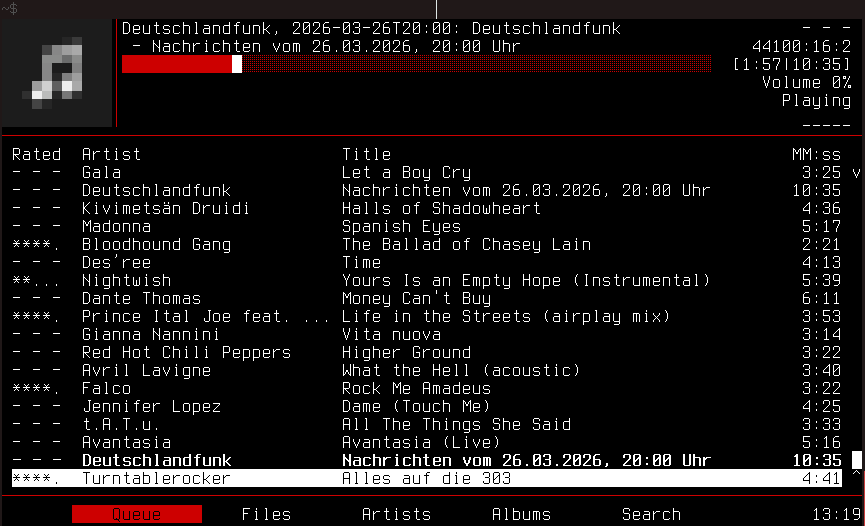
To use the theme, the following two files are required:
TUI Areas
Like for MAENMPC, the screen is divided into multiple areas, most of which stay equal across the tabs.
KKKKKKKKKKK│AAAAAAAAAAAAAAAAAAAAAAAAAAAAAAAAAAAAAAAAAAAAAAAAAAAAAAAAAAAAAAAAAAA
KKKKKKKKKKK│AAAAAAAAAAAAAAAAAAAAAAAAAAAAAAAAAAAAAAAAAAAAAAAAAAAAAAAAAAAAAAAAAAA
KKKKKKKKKKK│AAAAAAAAAAAAAAAAAAAAAAAAAAAAAAAAAAAAAAAAAAAAAAAAAAAAAAAAAAAAAAAAAAA
KKKKKKKKKKK│LLLLLLLLLLLLLLLLLLLLLLLLLLLLLLLLLLLLLLLLLLLLLLLLLLLLLLL CCCCCCCCCCC
KKKKKKKKKKK│LLLLLLLLLLLLLLLLLLLLLLLLLLLLLLLLLLLLLLLLLLLLLLLLLLLLLLL CCCCCCCCCCC
KKKKKKKKKKK│LLLLLLLLLLLLLLLLLLLLLLLLLLLLLLLLLLLLLLLLLLLLLLLLLLLLLLL CCCCCCCCCCC
────────────────────────────────────────────────────────────────────────────────
 DDDDDDDDDDDDDDDDDDDDDDDDDDDDDDDDDDDDDDDDDDDDDDDDDDDDDDDDDDDDDDDDDDDDDDDDDDDDD E
 DDDDDDDDDDDDDDDDDDDDDDDDDDDDDDDDDDDDDDDDDDDDDDDDDDDDDDDDDDDDDDDDDDDDDDDDDDDDD E
 DDDDDDDDDDDDDDDDDDDDDDDDDDDDDDDDDDDDDDDDDDDDDDDDDDDDDDDDDDDDDDDDDDDDDDDDDDDDD E
 DDDDDDDDDDDDDDDDDDDDDDDDDDDDDDDDDDDDDDDDDDDDDDDDDDDDDDDDDDDDDDDDDDDDDDDDDDDDD E
 DDDDDDDDDDDDDDDDDDDDDDDDDDDDDDDDDDDDDDDDDDDDDDDDDDDDDDDDDDDDDDDDDDDDDDDDDDDDD E
 DDDDDDDDDDDDDDDDDDDDDDDDDDDDDDDDDDDDDDDDDDDDDDDDDDDDDDDDDDDDDDDDDDDDDDDDDDDDD E
 DDDDDDDDDDDDDDDDDDDDDDDDDDDDDDDDDDDDDDDDDDDDDDDDDDDDDDDDDDDDDDDDDDDDDDDDDDDDD E
 DDDDDDDDDDDDDDDDDDDDDDDDDDDDDDDDDDDDDDDDDDDDDDDDDDDDDDDDDDDDDDDDDDDDDDDDDDDDD E
 DDDDDDDDDDDDDDDDDDDDDDDDDDDDDDDDDDDDDDDDDDDDDDDDDDDDDDDDDDDDDDDDDDDDDDDDDDDDD E
 DDDDDDDDDDDDDDDDDDDDDDDDDDDDDDDDDDDDDDDDDDDDDDDDDDDDDDDDDDDDDDDDDDDDDDDDDDDDD E
 DDDDDDDDDDDDDDDDDDDDDDDDDDDDDDDDDDDDDDDDDDDDDDDDDDDDDDDDDDDDDDDDDDDDDDDDDDDDD E
 DDDDDDDDDDDDDDDDDDDDDDDDDDDDDDDDDDDDDDDDDDDDDDDDDDDDDDDDDDDDDDDDDDDDDDDDDDDDD E
 DDDDDDDDDDDDDDDDDDDDDDDDDDDDDDDDDDDDDDDDDDDDDDDDDDDDDDDDDDDDDDDDDDDDDDDDDDDDD E
 DDDDDDDDDDDDDDDDDDDDDDDDDDDDDDDDDDDDDDDDDDDDDDDDDDDDDDDDDDDDDDDDDDDDDDDDDDDDD E
 DDDDDDDDDDDDDDDDDDDDDDDDDDDDDDDDDDDDDDDDDDDDDDDDDDDDDDDDDDDDDDDDDDDDDDDDDDDDD E
────────────────────────────────────────────────────────────────────────────────
 IIIIIIIIIIIIIIIIIIIIIIIIIIIIIIIIIIIIIIIIIIIIIIIIIIIIIIIIIIIIIIIIIIIIII JJJJJJJJ
Area A - Playing Song
In isolation, the area could look as follows:
Epica, 2016: The Holographic Principle                        - - -
06 - Beyond the Matrix                                   96000:24:2
████████████████████████████████████████████████████░   [6:13|6:26]
The lines are organized as follows:
- Artist, Year: Album and right-aligned: Rating
- Track No. - Title and right-aligned: the song’s sample rate and bit depth
- Progress inside the song and right-aligned: [time played|duration total]
Area C - MPD Player Status
Example:
Volume 0%
  Playing
    _____
The lines are as follows:
- Volume level
- Status Playing/Paused etc.
- A line with symbols for MPD status info: (
-means “inactive”)
| Position | Symbol | Meaning |
|---|---|---|
| 1 | r |
Repeat mode is active |
| 2 | z |
Random mode is active |
| 3 | S |
Single mode is active |
| 4 | C |
Consume mode is active |
| 5 | x |
Crossfade is active |
Area D - Main
This is the main area whose content depends on which tab is open.
Area E - Scrollbar
Displays the scroll progress. v and ^
symbols mark the ends of the scroll positions.
Area I - Tabs
This area is static in its contents and shows the tabs, highlighting the current one. Navigate to the tab of choice as follows:
| Key | Tab |
|---|---|
| F2 | Queue |
| F3 | Files |
| F4 | Albums |
| F5 | Search |
Area J - Playlist Duration
Shows how long the current playlist can play till it runs empty.
Area K - Album Art
If the terminal supports it, the upper left corner displays the album art assigned to the currently playing song.
Area L - Lyrics
If a .lrc file with timing information is placed next to
the song files, RMPC picks it up and displays the lyrics in this
pane.
[F2] - Queue
The format of the queue is tabular with the following columns:
- Rated - Rating of the song in stars or
- - -if not rated. - Artist - Album artist of the song
- Title - Song title
- MM:ss - Total duration of the song
[F3] - Files
The Files tab shows the file system tree starting from the root music directory. It shows the currently opened directory contents in the middle, the contents of the directory above on the left and the contents of the selected item on the right.
If the selected item is a song, the right panel displays metadata about the song.
[F4] - Albums
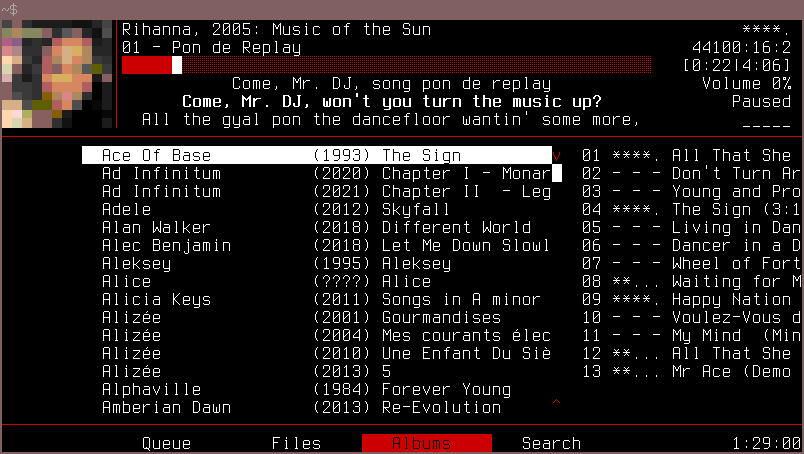
The Albums tab displays the list of albums in the middle and for the selected album (in the example: the first one) displays the list of songs in that album on the right.
The list is sorted by artist and date, allowing to jump to an artist
or album of choice quickly via the on-screen search function
(/).
[F5] - Search
Example:
│ Any Tag           :  <None>                   │
│ Album             :  <None>                   │
│ Album Artist      :  <None>                   │
│ Title             :  <None>                   │
│ Filename          :  <None>                   │
│───────────────────────────────────────────────│
│ Rating            :  Any                      │
│ Value             :  <None>                   │
│───────────────────────────────────────────────│
│ Liked             :  Any                      │
│───────────────────────────────────────────────│
│ Search mode       :  Contains                 │
│ Case sensitive    :  No                       │
│───────────────────────────────────────────────│
│ Reset                                         │
The Search tab shows a form with the various fields after which one could search. This is a subset of the search criteria that RMPC offers configured to the ones which are needed at the Ma_Sys.ma. The Liked option is not used here, but it seems it cannot be easily disabled right now…
Key Bindings
For the full key bindings, refer to file rmpc.ron.
╔══════════════════════════════════════════════════════════════════════════════╗
║  Navigate        Play                       Manage Songs                     ║
║  ↑ k   h         .     Volume up            d DEL  queue: Remove item        ║
║  ↓ j   l         ,     Volume down          * #    edit rating               ║
║  C-b   PgUp      s     stop                 C-z    show context menu         ║
║  C-f   PgDown    Enter play now             K      selected song info        ║
║  Home  gg        a     add @end                                              ║
║  End   G         A     add @current         Other                            ║
║  Tab   gt        >     next                 / n N  search on screen          ║
║  S-Tab gT        <     prev                 F2..F5 navigate tabs             ║
║                                             F10    exit                      ║
║  Toggle          Special Screens                                             ║
║  p  play/pause   F1    current song info         ┌───────────────────────────╢
║  z  repeat       oo    show outputs              │  Ma_Sys.ma Theme and Key  ║
║  x  random       oP    manage partitions         │     Bindings for RMPC     ║
║  v  single       ?     show key bindings         │     (c) 2026 Ma_Sys.ma    ║
║  c  consume                                      │     <info@masysma.net>    ║
╚══════════════════════════════════════════════════╧═══════════════════════════╝
See Also
Ma_Sys.ma Links
- rust(32)
- https://github.com/m7a/lp-rust-mlua
- https://github.com/m7a/lp-rust-mlua-sys
- maempsia(32)
- maenmpc(32