
Background
After upgrading my audio setup (cf. aes67_music_listening(37)), the need for the multi-player capabilities of maenmpc(32) was eliminated as only one player was in use at the same time.
Also, the Rust-based client RMPC (https://rmpc.mierak.dev/) was discovered and found to provide a configurable Terminal User Interface that could be configured to mimic MAENMPC closely. The RMPC TUI has lower latency and supports useful additional features compared to MAENMPC. E. g. RMPC supports browsing files and can display synchronized lyrics as a song is played. In summary, this makes it a strong candidate client to prefer for interactive usage.
Together with some ideas to revise the algorithms and features of MAENMPC (e. g. to get its playlist generation working on a phone without running into timeouts) it was decided to split selected remaining MAENMPC-exclusive features into a new, smaller “sidecar” client which could run in parallel to RMPC to replace MAENMPC.
The resulting client is MAEMPSIA which is an acronym for Ma_Sys.ma Erlang Music Player SIdecar Automation.
Abstract
MAEMPSIA is an experimental utility MPD client. It is intended to run in parallel to a primary/interactive MPD client. A such, MAEMPSIA offers only very limited interactive functionality and focuses on background tasks which are typically not found in interactive clients.
- ratings
- Full support for ratings by using the MPD stickers database. This includes song and album ratings. It is mostly not intended to use the song ratings interactively from MAEMPSIA but they are processed by the playlist generation feature.
- play counts
-
Support for song play counts via the
playCountsticker in the MPD database. Additionally, an automatic updating ofplayCountstickers with data from a Maloja server is possible. - scrobbling
- Support for scrobbling to a Maloja server or JSON file. The JSON file uses the data format of the Maloja API such that it can later be easily imported to Maloja.
- news podcasts
- Support for news podcasts which are automatically enqueued into the playlist as a new episode appears.
- playlist generation
- Support for generating “radio-like” playlists based on the ratings and play counts. This is a new algorithm compared to MAENMPC which attempts to solve the same problem slightly differently with different tradeoffs in terms of performance and quality.
- web interface
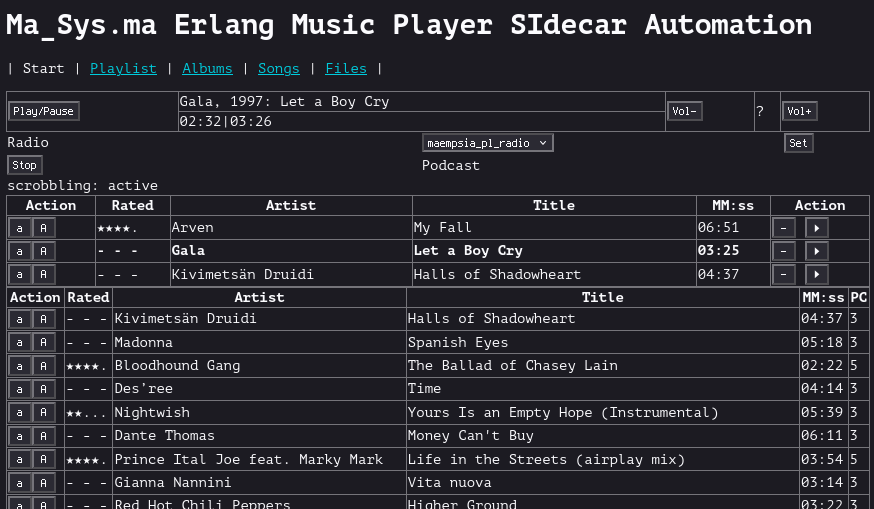
- A minimalist web interface (see screenshot) is provided to browse the full song database and enable/disable server features at runtime. The design idea behind this interface is to not offer buttons that replace the whole playlist. This is intended to enable usage on the phone e. g. from inside cars or buses without fat-fingering playlist deletion. In practice, this interface may be too slow to be generally usable on a phone.
Compared to MAENMPC, the status of above listed features is as follows:
| Feature | MAENMPC | MAEMPSIA | Notable Differences |
|---|---|---|---|
| ratings | Y | Y | MAEMPSIA supports album ratings in addition to song ratings |
| play counts | Y | Y | MAEMPSIA maintains playCount stickers, MAENMPC supports those only in a read-only fashion |
| scrobbling | Y | Y | In addition to the scrobbling, MAEMPSIA maintains
playCount stickers |
| news podcasts | Y | Y | MAEMPSIA doesn’t offer multi-player related advanced features like the SSH client |
| playlist generation | Y | Y | MAEMPSIA uses a modified algorithm (see section Radio Playlist Generation Algorithm) |
| web interface | N | Y | The MAEMPSIA web interface has fewer capabilities compared to the TUI of MAENMPC |
WARNING - Maintenance Status
As an experimental client, MAEMPSIA is not recommended for general usage. Of course, it is free software so you may use it subject to the license. Keep in mind that due to the reasons outlined below, the documentation here is incomplete and primarily serves for my own reference.
It is not clear if MAEMPSIA will be a “daily driver” or is only a step towards replicating some of the features to RMPCD (https://github.com/mierak/rmpc/tree/master/rmpcd). Specifically, RMPCD very much looks like it is designed to solve the same problem as MAEMPSIA i. e. providing a sidecar server which runs those tasks which are not well-suited for integration into an interactive player. Given its extensible architecture with Lua scripting, it could be possible to replace MAEMPSIA with RMPCD plugins.
Whether MAEMPSIA is here to stay is thus dependent on whether there is some advantage to be gained from RMPCD integration in favor of the completely separate client and whether it is worth maintaining a completly own client to benefit from some niche advantages that MAEMPSIA might provide over RMPCD for the Ma_Sys.ma use cases.
Setup Instructions
The setup is similar to the one described for maenmpc(32) as MAEMPSIA uses a similar technical foundation: It is also built using Erlang. Refer to the MAENMPC documentation for more details, below sections capture the gist of what is necessary to build and run MAEMPSIA.
Installation on Debian-based OS
Compile-Time Dependencies
apt install ant devscripts erlang-base erlang-jiffy erlang-inets erlang-mochiweb rebar3 gitCompile and Install
ant package
sudo apt install ../*.deb
Installation using Rebar3
This is also the way to get MAEMPSIA to run on a smartphone using Termux!
Required Dependencies
rebar3Setup Instructions
Uncomment the commented-out lines in rebar.config, then
compile MAEMPSIA using:
rebar3 releaseAfter successful compilation, run MAEMPSIA:
./_build/default/rel/maempsia/bin/maempsia foregroundConfiguration
Like MAENMPC, MAEMPSIA requires configuration to run successfully. An
example configuration is supplied as config/sys.config
along the source code of the program. Unless a command-line argument
-config <FILE> is given, this example configuration
file is used automatically.
Local changes can be performed on a copy which is passed via the
-config <FILE> CLI argument or directly on the source
file level before compiling.
[{maempsia, [
    {mpd, #{
        ip              => {"127.0.0.1", 6600}
    }},
    {webserver, #{
        ip              => {127, 0, 0, 1},
        port            => 9444
    }},
    {webinterface, #{
        files           => [
                <<"/proc/asound/RAVENNA/pcm0p/sub0/hw_params">>,
                <<"/tmp/maempsia.log">>
                ]
    }},
    {radio, #{
        schedule_len    => 60,
        filter          => {land, [
                    {lnot, {base, "epic"}},
                    {lnot, {land, [
                        {tagop, artist, eq, ""},
                        {tagop, album,  eq, ""},
                        {tagop, title,  eq, ""}
                    ]}}
                ]}
    }},
    {playlist_gen, #{
        maempsia_pl_radio => #{
            pattern => [1, 1, 1, 2, 1, 1, 1, 2, 1, 0, 1, 2]
        }
    }},
    {maloja, #{
        url             => "http://127.0.0.1:42010/",
        key             => "NKPCt5Ej7vkilkRtx5EubIa4fG78xhPEbcljU49rHVjDUgV5WmEHl3VDHjZFDrQK",
        ignore_file     => "/data/programs/music2/supplementary/maempsia/ignore_scrobbles.config",
        scrobble_active => true,
        interval        => 28000,
        use_album_art   => true,
        scrobble_file   => "scrobble_test.txt"
    }},
    {podcast, #{
        conf            => "/data/programs/music2/supplementary/news/conf",
        glob            => "/data/programs/music2/supplementary/news/pod/**/*.mp3",
        timeout         => 50000,
        interval        => 300000,
        target_fs       => "/data/programs/music2/epic/x_podcast/podcast.mp3",
        target_mpd      => "epic/x_podcast/podcast.mp3"
    }}
]},
{kernel, [
    {logger_level, info},
    {logger, [
        {handler, default, logger_std_h, #{
            level     => warning,
            formatter => {logger_formatter, #{single_line => true}}
        }},
        {handler, info, logger_std_h, #{
            level     => info,
            config    => #{file => "/tmp/maempsia.log"}
        }}
    ]}
]}].- Section
mpd - Configure the MPD to connect to. The default may work in many cases.
- Section
webserver - Configure the port of the web interface. The default (9444) may work in many cases.
- Section
webinterface - Configures some files which can be viewed in the Files tab in the web interface. This is most useful for viewing the MAEMPSIA log files but may also help to check the ALSA parameters as shown in the example config.
- Section
radio -
General settings for playlist generation. The
schedule_lenis the default length of the playlist to generate where the default (60 songs) may be OK for many cases. Thefilteris an MPD filter in erlmpd(32) syntax. The example configures to exclude the top-level directoryepicand any songs for which there is either no Artist, Album or no (song) Title metadata assigned. Refer to the MPD protocol and ERLMPD documentation to find out about the capabilites and syntax of filters. - Section
playlist_gen -
Configures playlist generation algorithms. At the time of this writing,
there is only one algorithm
maempsia_pl_radiowhich is configured by specifying apattern. See Section Radio Playlist Generation Algorithm for details - Section
maloja -
This configures the Maloja server to use with the fields having the same
meanings as for MAENMPC. Most users must change
use_album_arttofalsebecause this setting works with a pre-release PR applied on top of an older Maloja code base…. Removeurlandkeyto generate JSON scrobbles atscrobble_fileinstead of directly scrobbling to Maloja. Theignore_filecan be used to exclude some patterns from the synchronization ofplayCountstickers with Maloja. This is mostly useful to identify songs which are not in the MPD database but for which scrobbles exist in Maloja. The advantage of keeping such a list compared to the default behaviour where MAEMPSIA prints messages to the log files upon encountering such a scrobble is that it may help focusing attention on actual failures to synchronize e. g. if a song is scrobbled under a slightly different spelling in Maloja it may assign the scrobbles there but MAEMPSIA may not find them, leading to skewedplayCounttracking under some circumstances. - Section
podcast -
Configures podcasts to automatically check using the
podgetprogram which must be installed and available in the$PATH. This is similar to MAENMPC except that no SSH connection and no resampling can be configured here. As a consequence, theResamplerdependency is no longer needed, either. - Section
logger -
Configures the locations of log files where MAEMPSIA prints status
information. Also, the log level can be set near this section to get
more (
debug) or less (warning) verbose output in the log file.
Example ignore_file contents:
[
    {<<"deutschlandfunk">>, <<"deutschlandfunk">>, any},
    {<<"deutschlandfunk">>, <<"aktuelles">>,       any},
    {<<"snow patrol">>,     <<"eyes open">>,       <<"chasing cars">>},
].
The syntax of each entry is Artist/Album/Title e. g. here some
podcast episodes are excluded from the synchronization in addition to
the song Chasing Cars by Artist Snow Patrol from Album
Eyes Open. This song was present at a past time in the MPD
database but play counts cannot be synchronized because it doesn’t exist
in the MPD database right now. Hence put it in the
ignore_file to avoid being warned about this particular
entry on each synchronization. The special value any can be
used to exclude all entries where the preceding fields match i. e. there
need not be a particular Title assigned to exclude the podcast
episodes.
Command Line Interface Syntax
The CLI syntax is very similar to MAENMPC except that some options have not been ported to MAEMPSIA.
USAGE maempsia [-skip-sync] [-radio [GEN]] -- run regularly
USAGE maempsia -help                       -- this page
USAGE maempsia -sync-playcounts            -- sync playcounts then exit
USAGE maempsia -import-scrobbles JSON      -- import scrobbles from file
USAGE maempsia -generate-schedule M3U [-generator GEN] [-length COUNT]
                                           -- generate playlist schedule

-skip-sync         Don't synchronize playCount sticker from Maloja on startup
-radio GEN         Start radio service with defined algorithm (see config)
-sync-playcounts   Synchronize playCount from Maloja (only)
-import-scrobbles  Import scrobbles from JSON file. Such file is generated if
                   `maloja/key` is absent in config. Does not update MPD.
Note that the -config <FILE> is not documented
here because it is offered by Erlang/OTP and not specific to
MAEMPSIA.
Radio Playlist Generation Algorithm
The idea behind the radio playlist is to follow a random shuffle of songs establishing that within a short time frame of listening (here measured in songs) a nice song occurs and also that the songs with low play counts are generally preferred such that repeating the algorithm eventually causes the whole song database to be played.
I. e. it is a shuffle scheme with certain biases to make the random playlist more enjoyable to listen to.
Old Algorithm
The algorithm introduced with gmusicradio(32) and also ported to MAENMPC was based on the following general ideas:
- Assemble songs into lists grouped by rating and then by play count.
- Shuffle these lists, keeping a preference to put the low play counts in front.
- If there are too many “mediocre rated” songs compared to “nicely rated” ones, duplicate the nicely rated songs list.
- Merge the lists together, choosing which list to operate on based on how far the relative progress in the respective list is i. e. prefer to append from the list of least progress.
This was rooted in the assumption that in the general case, the whole song database should be processed hence this list-centric view. Also, in the typical case of not repeating the nicely rated list, this would cause no song to be repeated but also if there was some “below average” rated songs they were merged without considering them in the repetition scheme causing the generated playlist to sometimes prefer playing back below average songs with unexpectedly high frequency.
New Algorithm
The new algorithm by MAEMPSIA is simpler and at the same time addresses some of the shortcomings of the old one.
It generally works as follows:
- Assemble songs into lists grouped by rating.
- Shuffle each of these lists.
- Set current play count to 0, use a pattern to specify when to play songs of which rating.
- Repeat the pattern until the requested number of playlist entries
has been output, getting one rating from the pattern to identify the
next list to chose from:
- Find the first song with the current rating and play count in the list
- If there is none, increment play count and retry without advancing in the pattern. (Note that for this algorithm to terminate, each list by rating must contain at least one song!)
- If a song was found, output it as playlist entry and increment its play count in the list. (This makes it eligible for being played back again with the incremented play count resulting from having this song in the playlist once already)
An obvious weakness of this algorithm shows if are a few songs in the database which have a much lower play count compared to the remainder of the database: In event of adding new music to the database this algorithm repeats the new songs more often. In general, it is thus required to achieve higher accuracy in updating the MPD play counts otherwise the playlists may become boring rather quickly.
Apart from that, this algorithm is surprisingly simple and generally achieves better playlists compared to the preceding approach. It is also easier to fine-tune because the pattern can be of any shape or length desired.
E. g. the default pattern is as follows:
[1, 1, 1, 2, 1, 1, 1, 2, 1, 0, 1, 2]The numbers 0, 1, 2 are used to encode:
- 0 - lower than average (2 stars). 1 star or less excludes the song from the playlist generation automatically.
- 1 - average (3 stars or not rated)
- 2 - above average (4 or 5 stars). No distinction is made between 4 or 5 stars because usually, the play count consideration will be enough to ensure that 5 stars songs are played only on rare occasions (I typically enqueue my favorite songs manually and in general they have much higher play counts than the others)
An example playlist using this pattern looks as follows (excerpt from w3m rendering of the MAEMPSIA web interface):
┌──────┬─────┬─────────────────┬─────────────────────────────────────┬─────┬──┐
│Action│Rated│     Artist      │                Title                │MM:ss│PC│
├──────┼─────┼─────────────────┼─────────────────────────────────────┼─────┼──┤
│[a][A]│- - -│Madonna          │Like a Virgin                        │03:10│3 │
├──────┼─────┼─────────────────┼─────────────────────────────────────┼─────┼──┤
│[a][A]│- - -│Pink Floyd       │Goodbye Blue Sky                     │02:47│3 │
├──────┼─────┼─────────────────┼─────────────────────────────────────┼─────┼──┤
│[a][A]│- - -│Limp Bizkit      │Re‐Entry                             │02:38│3 │
├──────┼─────┼─────────────────┼─────────────────────────────────────┼─────┼──┤
│[a][A]│★★★★.│Atargatis        │4 Giving                             │01:14│5 │
├──────┼─────┼─────────────────┼─────────────────────────────────────┼─────┼──┤
│[a][A]│- - -│Temperance       │Goodbye                              │03:48│3 │
├──────┼─────┼─────────────────┼─────────────────────────────────────┼─────┼──┤
│[a][A]│- - -│Madonna          │Dress You Up                         │04:02│3 │
├──────┼─────┼─────────────────┼─────────────────────────────────────┼─────┼──┤
│[a][A]│- - -│Wir sind Helden  │Müssen nur wollen                    │03:36│3 │
├──────┼─────┼─────────────────┼─────────────────────────────────────┼─────┼──┤
│[a][A]│★★★★.│Sting            │Russians                             │03:58│5 │
├──────┼─────┼─────────────────┼─────────────────────────────────────┼─────┼──┤
│[a][A]│- - -│Beyond the Black │In the Shadows                       │04:54│3 │
├──────┼─────┼─────────────────┼─────────────────────────────────────┼─────┼──┤
│[a][A]│★★...│Lyriel           │My Favourite Dream                   │03:49│3 │
├──────┼─────┼─────────────────┼─────────────────────────────────────┼─────┼──┤
│[a][A]│- - -│Mr Hudson        │Straight No Chaser                   │03:29│3 │
├──────┼─────┼─────────────────┼─────────────────────────────────────┼─────┼──┤
│[a][A]│★★★★.│Britney Spears   │Oops! I Did It Again                 │03:32│5 │
└──────┴─────┴─────────────────┴─────────────────────────────────────┴─────┴──┘
I. e. there are first 3x unrated songs (1, 1, 1), one nicely rated one (2), then again 3x unrated (1, 1, 1) another nice one (2) and then one unrated, one two-star and again an unrated one (1, 0, 1) followed again by a nicely rated one (2).
Rationale for redundantly using playCount stickers and Maloja
A notable change compared to MAENMPD is the extended usage of the
playCount sticker in MPD which used to be processed
read-only by MAENMPD but which MAEMPSIA writes to as part of its
scrobbling client.
The ideas behind adding extended playCount were as
follows:
- Algorithms like the playlist generation could use access it in an
uniform way alongside the
ratingsticker which was already required for them before. - The playlist generation no longer requires a dependency on Maloja and may thus benefit more users.
- The special handling for phone usage (which used
playCountalready before) could be reduced. - The
playCountsticker can be viewed from RMPC offering a way to check the play count interactively. (MAENMPC did this by querying Maloja on-demand, but this is not easily done with RMPC and was a little bit error prone to begin with).
The ideas behind still keeping the Maloja scrobbling and adding the synchronization on startup were as follows:
- Scrobbling is more precise than play count. At any time, play count can be recovered from the scrobbling but not the other way around.
- It is nice to browse the history of played songs and view trends in the Maloja web interface hence this has a value of its own.
- Scrobbling is helpful for the distributed collection of scrobbles which can then be merged into one “reference” Maloja instance.
- The synchronization is limited to only ever incrementing the
playCounti.e. if there is some song that is not found in the scrobbles, but which was played while MAEMPSIA was active, itsplayCountmay become higher than the scrobble count retrieved from Maloja (until metadata in Maloja have been fixed at least). The synchronization then prefers the higher value to prevent the new playlist generation algorithm from insisting on enqueuing the same songs again and again. (This had happened a few times in the past with MAENMPC and if the song was OK it was hard to notice but still subconciously annoying…)
Future Directions
See section WARNING - Maintenance Status. In general, RMPC and RMPCD seem to be the future. Also, some more work on the playlist generation front may be done to generate convincing playlists for car usage. The web interface may be revised based on experience with phone usage e. g. it might make sense to provide some pagination to speed up the page rendering etc.
See Also
MPD Resources
- Homepage https://musicpd.org/
- Well-known stickers https://github.com/jcorporation/mpd-stickers
Interesting MPD Clients
- RMPC https://rmpc.mierak.dev/ – TUI
- myMPD https://jcorporation.github.io/myMPD/ – web based
- Cantata https://github.com/nullobsi/cantata – QT
Compatible Software
Relevant Ma_Sys.ma Pages Related to Audio Topics
- gmusicradio(32) – first idea for a Radio Playlist Generation Algorithm
- aes67_music_listening(37)
- erlmpd(32)
- maenmpc(32) – includes some impressions from the clients myMPD and Cantata